HEYGEN
HeyGen is an AI-powered video creation platform where users can make professional videos instantly, no cameras, no studios, just text and an avatar.
Avatars are at the heart of the product, they’re our biggest differentiator and our main driver of engagement. Every new avatar equals new videos, and every new video equals new credits and retention.
When I joined the Avatars squad, users could upload a single photo and generate a talking avatar. It felt magical, but it was also static, one photo meant one look, one outfit, one background.
That’s what led to our next big step: Looks - a way for users to generate multiple versions of themselves in different scenarios while keeping their face identity consistent.
Before “Looks"
• Users could only create avatars using their photo
• That avatar was locked to one outfit, pose, and background (whatever photo they uploaded).
• This made avatars feel repetitive and hard to reuse across different contexts (professional vs casual, ads vs personal use).
• For a product like HeyGen, where the North Star metric is # of videos created per user, this was a growth ceiling → fewer avatars = fewer videos.
Why "Looks"
if we could expand avatars from a single static look into a system of multiple looks, people would not only get more creative value but also make more videos, which ties directly to our business goals around engagement and credit usage.
• If users could generate multiple variations of themselves (different outfits, poses, and backgrounds), they would naturally create more videos.
• “Looks” = different appearances of the same avatar, while the face identity remains consistent.
• More looks = more creative freedom → more reasons to generate videos → direct lift in the North Star metric.
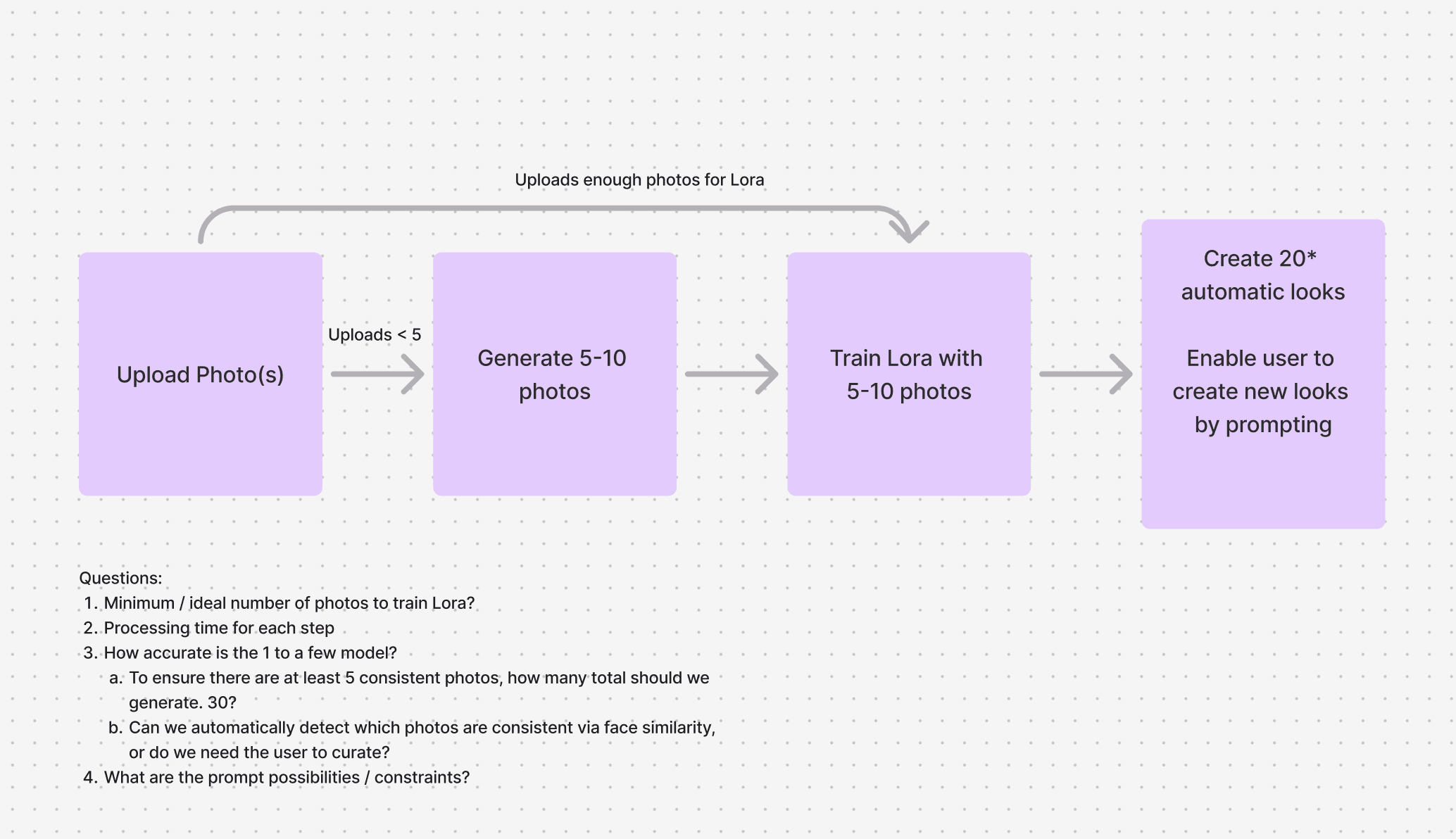
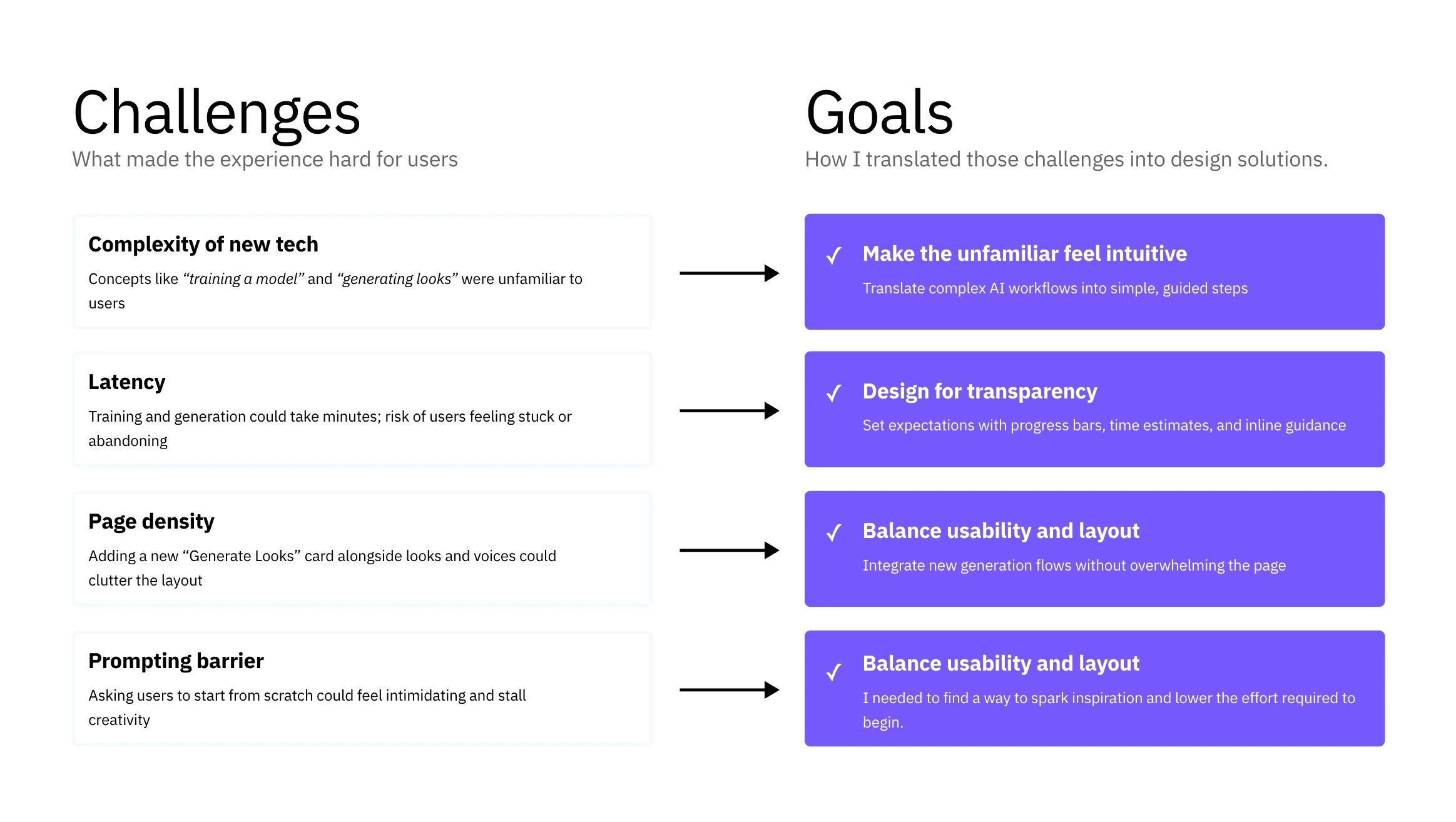
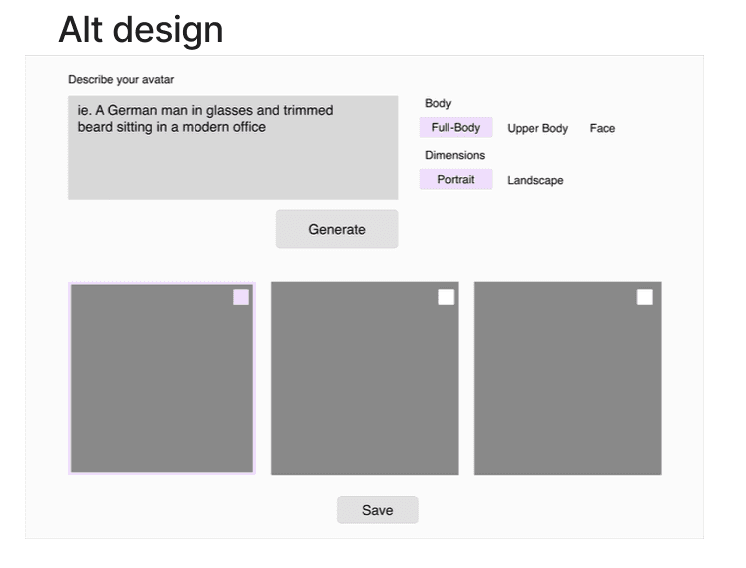
I Explored two directions:
Modal flow: This gave a focused experience but blocked them while waiting.
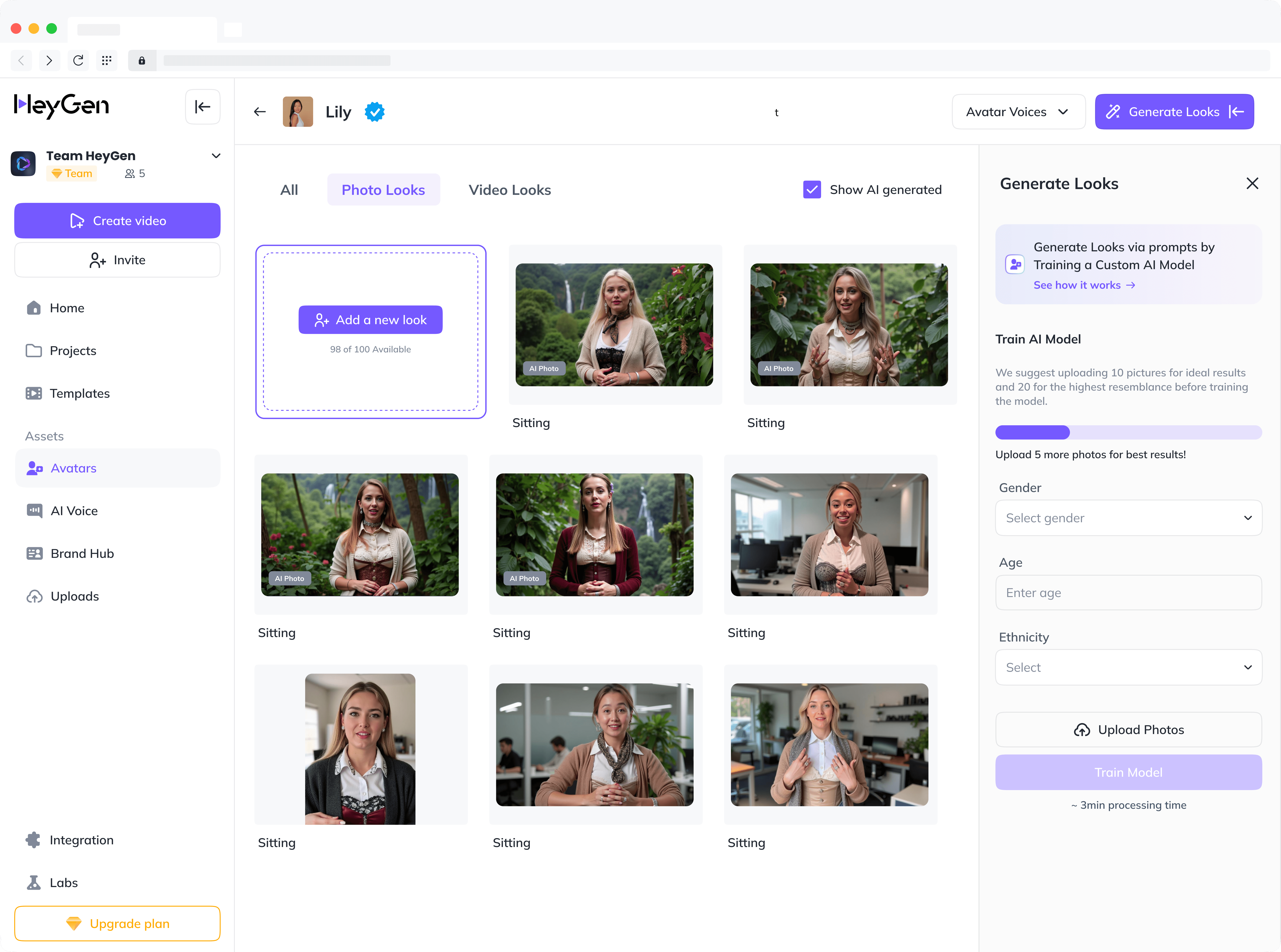
Sidebar card flow (chosen): Brought the generation card into the Looks page as a right-side panel. This allowed multitasking users could browse or edit existing looks while new ones generated in the background.

Because this was a brand-new concept, I needed to guide users clearly:
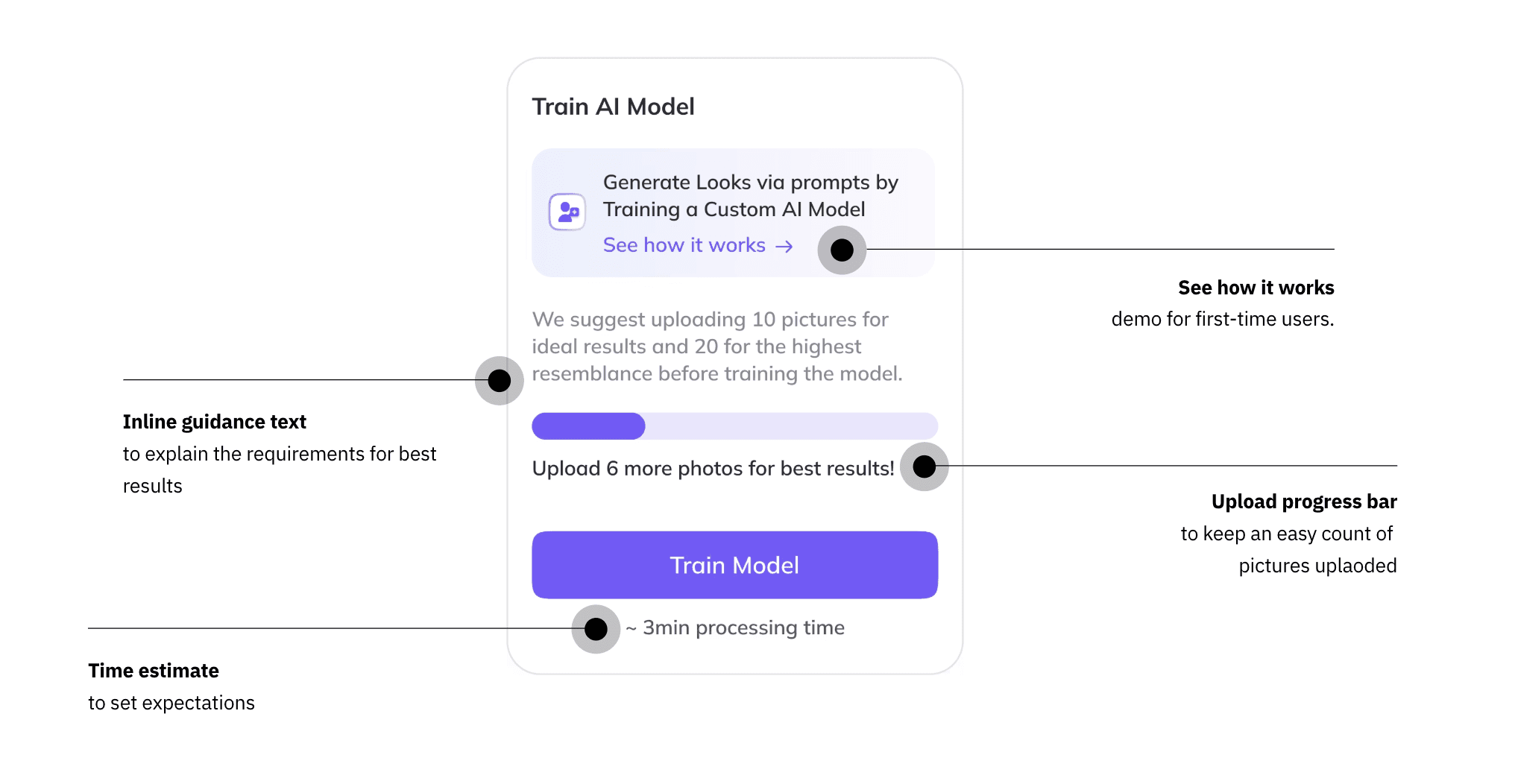
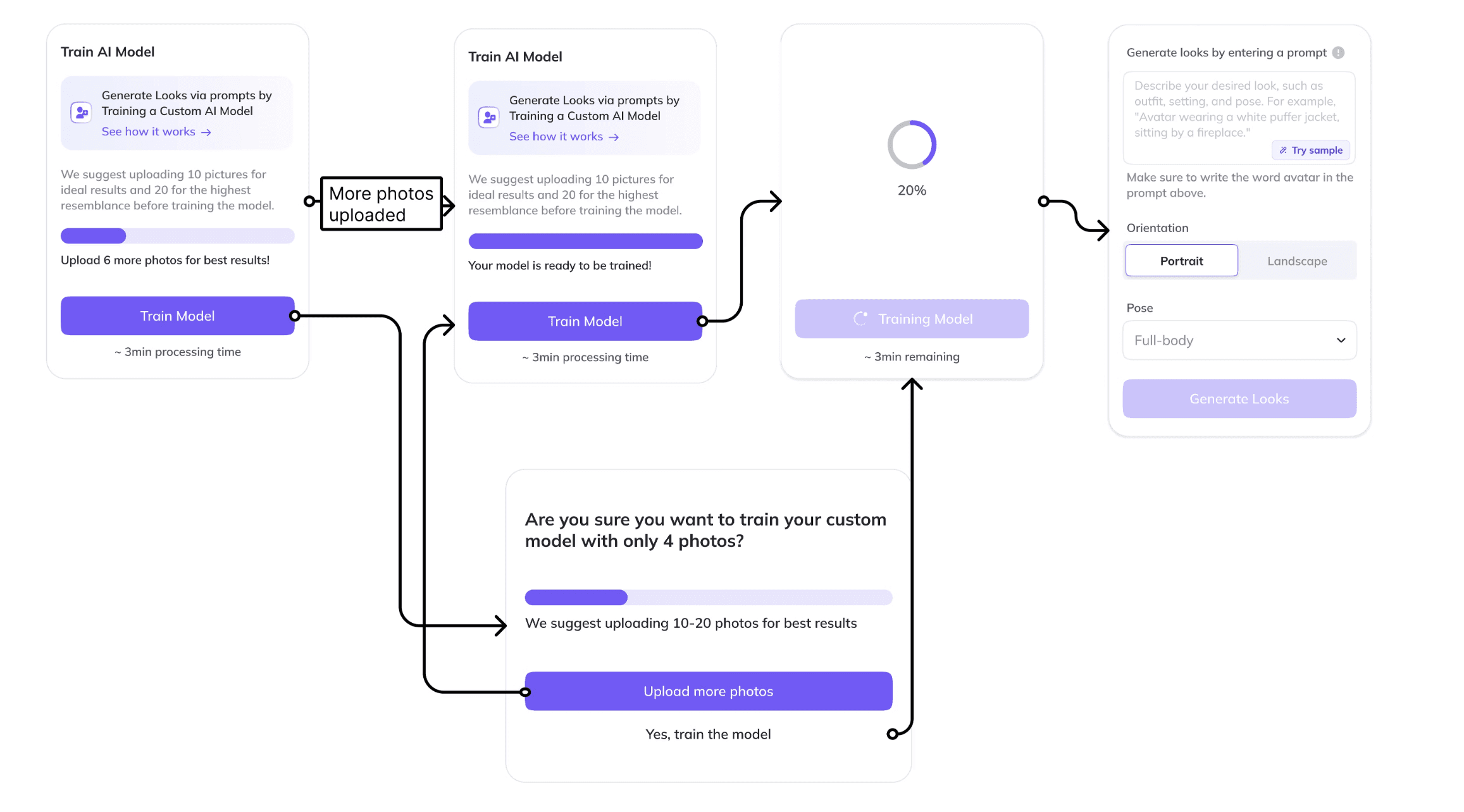
Training a model can sound intimidating - I Added a “See how it works” link to a Help Center demo for first-time users.
Placed inline guidance text: “Upload at least 10 photos for ideal results, 20 for highest resemblance.”
Added an upload progress bar showing how many photos were uploaded and whether they’d hit the “ideal” threshold (10+ photos) for best resemblance.
Displayed time estimate (“~3 minutes”) and a percentage progress bar to set expectations.
We tested two layouts.
Initially placed the Generate card on the left side of the grid as a persistent card, but it competed visually with navigation and users couldn't dismiss it.
Moved it to the right side as a collapsible panel, which created clearer hierarchy and reduced clutter.


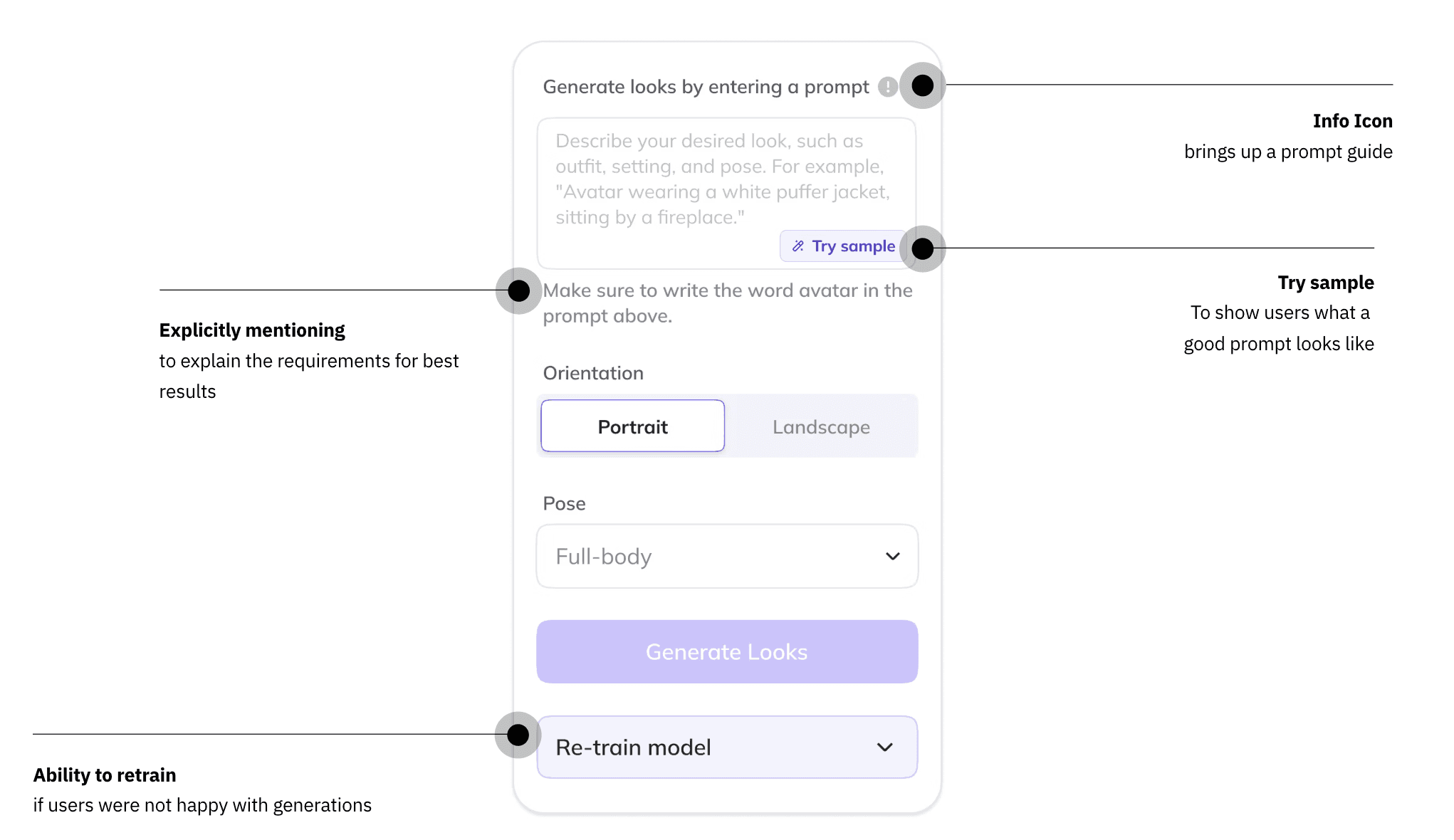
Another design decision was around prompting. Early tests showed users struggled to come up with effective prompts on their own. Without guidance, output quality was inconsistent, and many users abandoned the flow.
Solutions:
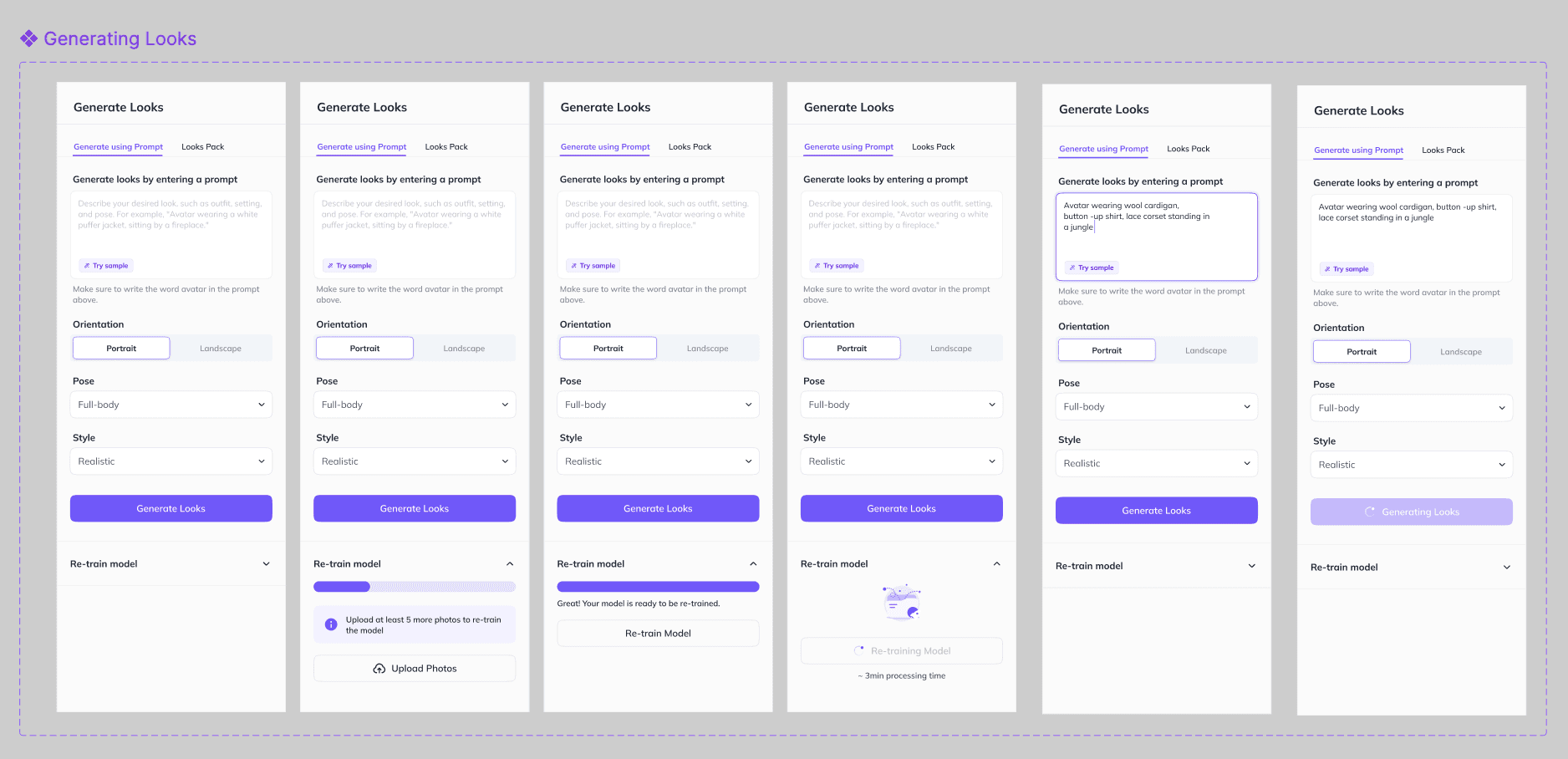
• “Try Sample” button → instant examples.
• Curated “Looks Packs” curated sets of prompts around themes (Vacation, Professional, or Old Money) → 20–30 cohesive variations with one click.

Higher engagement: Users shifted from creating 1–2 photo avatars to generating 20–30 looks per avatar. (users were generating around 50,000 new looks every month)
Increased video creation: More looks led to more avatar videos per user, our key success metric.
Revenue lift: Credit usage and upgrades increased after gating training for free users and introducing usage limits.
Lower friction: Looks Packs and sample prompts reduced cognitive load, making generation accessible to non-technical users.
Scalable foundation: The new system set the stage for advanced features like outfit customization and combining photo + video avatars.
Explainability matters as much as functionality The success of “Looks” wasn’t just in the outputs - it was in making a complex AI workflow feel approachable. Clear guidance + progress states directly improved trust and adoption.
People need inspiration Users freeze when asked to be creative from scratch. By giving them curated packs and samples, we reduced cognitive load and boosted engagement.
Latency isn’t just technical - it’s emotional Users don’t mind waiting if they know what’s happening. Showing progress estimates turned frustration into anticipation.
Integration beats isolation The sidebar solution showed me that embedding new features into existing workflows drives higher adoption and feels more natural.
As we continued scaling the feature, our backend models and our users evolved quickly.
We introduced new models like Nano Banana, which allowed precise, reference-based generation and prompt-based edits.
Users could now type “change background to office” or “add blue shirt,” and the model would do it instantly.
But our existing design wasn’t built for this.
We decided to unify the entire experience - instead of users navigating into each avatar’s separate page, they could now generate Looks directly from the main Avatars screen.
In this new layout:
The prompt box sits at the center of the experienc, just like a chat interface.
Users first selects an avatar identity to start creating looks for.
A clean dropdown lets users choose the model for generation Nano Banana, or Flux Lora.
All results are previewed inline no more switching pages or tabs.
This structure simplified the experience into one clear mental model:
Choose an identity → Type your prompt → Generate new Looks - all in one place.
Support new model capabilities.
The launch of Nano Banana unlocked reference-based generation and precise prompt edits (like “add lighting” or “change outfit”). The old flow didn’t support that, users had to train first. The new design lets them pick a base look and edit directly from one central prompt box.Make the experience non-intrusive.
Previously, the generation card sat permanently on each avatar’s Looks page, taking up space even when users didn’t need it. The redesign moved generation into the main Avatars screen with a focused, lightweight prompt area that appears only when needed.Design for modular scale.
As we introduced more models and features, the old interface couldn’t keep up, it relied on long dropdowns and deep settings menus. The new system is modular, so options like reference image, model selection (Nano/Flux), and choosing looks pack can be added inline without clutter.Remove the training barrier.
Manually training before generation was one of our biggest drop-offs. Now, users see the prompt box right away. When they hit Generate, we check if the model is trained:If not, we prompt them to upload a few more photos for better results.
If yes, we proceed seamlessly.
This way, users experience the core value - generating new looks before facing any setup.
Faster onboarding: Users could start generating instantly, without needing to understand “model training.”
Reduced drop-offs: No more abandoning mid-training; users stayed engaged.
Higher engagement: Generation happened in one step, so people explored more.
Future-ready foundation: The modular design could easily support upcoming features like gesture control, outfits, and multi-avatar scenes.
✅ Design must evolve with the models. As AI matured, our UX had to shift from setup-heavy to prompt-driven.
✅ Simplicity increases adoption. Removing barriers like manual training helped more users try the feature.
✅ Familiar UX patterns work. The chat-style prompt box made generation feel intuitive and modern.
✅ Modularity ensures longevity. A flexible layout meant we could keep innovating without redesigning from scratch.
(2016-25©)
